


Car Trader – Buy & Sell Cars
3.220.00 Reviews
App Specs
- Version
- 1.8.2
- Updated On
- License
- Free
- Downloads
- 10,000+
- Developer
- Car Trader Technologies Corp.
- Categories
- Auto & Vehicles
- Platform
- Android
Screenshots
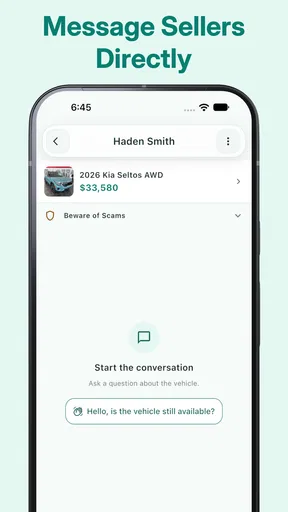
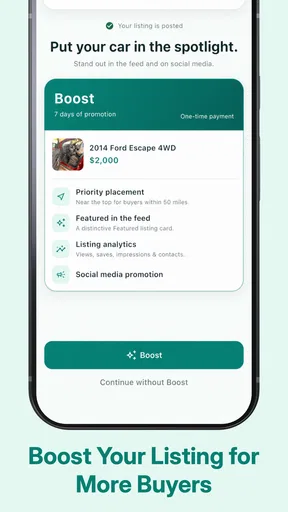
 Analysis by AppCompare
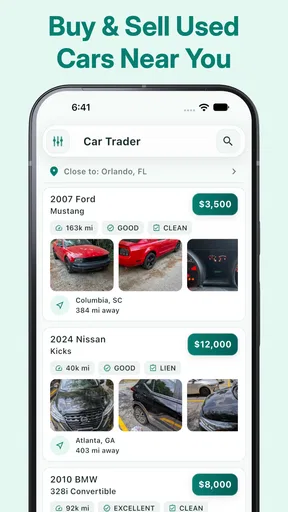
Buying or selling a used car from a phone sounds simple until you are trying to compare several listings, reply to a stranger, and remember which vehicle had the better price. Car Trader – Buy & Sell Cars is built around that exact local-search problem. I found it most useful as a quick way to browse nearby vehicles and start conversations with people who may be ready to make a deal, rather than as a complete replacement for careful research, inspection, and paperwork.
The app comes from Car Trader Technologies Corp. and sits in the Auto & Vehicles category. It is free to install, aimed at Everyone, and supports Android 7.0 or later. Its current version is 1.8.2, while the app itself dates back to November 9, 2015. That history gives it a straightforward, practical feel: the focus is on finding cars, looking through available choices, and connecting locally instead of turning the process into a large automotive information system.
My overall impression is mixed but useful. The local angle can save time when I already know roughly what kind of vehicle I want, yet the experience depends heavily on having a working connection and on sellers keeping their listings accurate. With an average rating of 3.2 from around 66 ratings, it is fair to approach the app as a convenient marketplace tool with limitations, not as a guarantee that every listing or conversation will lead somewhere.
How the local marketplace feels in everyday use
The first thing I would do with this app is browse without committing to a purchase. That matters because used-car shopping often begins with a vague idea: perhaps I want a small hatchback, an inexpensive second vehicle, or something suitable for a new driver. Seeing nearby offers can turn that vague idea into a more realistic sense of what is available and what sellers are asking.
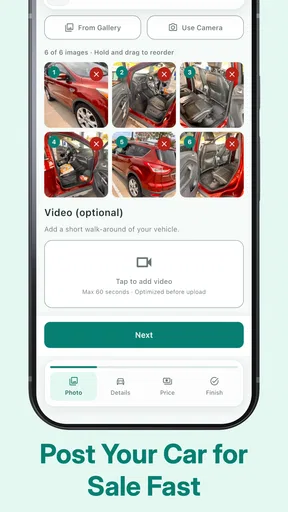
The local focus is also helpful for sellers. A private owner who wants to reach people in the same area has a more direct route to potential buyers than posting a notice and waiting for someone to discover it by chance. The value is not only in displaying a vehicle; it is in creating a place where the two sides can begin talking. That conversation is where practical questions become important: Is the car still available? Can I see it this weekend? Are there known mechanical problems? Is the listed price firm?
I would not treat the first screen of listings as a finished shopping shortlist. A used car can look attractive because of its price or location while still being unsuitable once I check mileage, ownership history, maintenance, insurance, and inspection requirements. The app is best used to discover candidates, then move into a more careful verification process.
There is a useful distinction between convenience and confidence here. Car Trader can make it easier to find a seller nearby, but proximity does not prove that the vehicle is in good condition. In fact, a nearby listing can encourage rushed decisions because viewing the car feels easy. I would still prepare questions before contacting anyone and arrange a proper inspection before discussing a final purchase.
Worth Reading Before You Choose

EA SPORTS FC Mobile 26 Is a Bigger Football Game, but It Takes Time

Flipboard Shows What News Apps Must Do Beyond the Feed

Switching to Android Auto Means Rethinking Your Driving Routine

Google Calendar Makes a Crowded Week Easier to Manage

Ludo King Makes the Most of the Minutes Between Plans

Baby Panda World Brings Quick Play to Modern Phones, but Its Game Library Feels Busy
When the connection becomes part of the experience
Because the app is centered on current marketplace activity and contact between buyers and sellers, connectivity is not a minor background detail. Browsing depends on being able to load available listings, and communication depends on reaching the other person through the app’s connected experience. If I am in a weak-signal area, traveling through a parking garage, or switching between mobile networks, I would expect the experience to become less dependable.
This changes how I would use it during a real search. At home, I can calmly compare vehicles and make notes. On the move, I might open the app outside a dealership, at work during a break, or while visiting a neighborhood where a seller says the car is located. Those moments are convenient, but they also create pressure to act quickly. I would avoid making an offer simply because a listing loads at the right moment.
A practical habit is to save the important details in my own notes before leaving a reliable connection. I would record the vehicle description, asking price, seller contact details as shown, and the questions I want answered. This is not a claim that the app provides a special offline mode; it is simply a sensible way to avoid depending on a live connection while traveling to view a car.
The same advice applies when contacting sellers. I would send a clear first message instead of a vague “Is this available?” A better message identifies the vehicle, asks whether it is still for sale, and proposes a realistic viewing time. That reduces unnecessary back-and-forth and makes it easier to judge whether the seller is responsive. The app starts the conversation, but the quality of the deal depends on what happens after that first message.
A realistic mobile scenario
Imagine I am looking for a second-hand car for commuting. During lunch, I browse nearby offers and notice one that appears suitable. I check the basic details, compare it with other local options, and contact the seller with questions about its condition and availability. Later, while traveling to the viewing, I lose reliable service. If I had not written down the address, listing details, and questions beforehand, a simple connectivity problem could make the appointment unnecessarily awkward.
That scenario shows both sides of the app. It is convenient because I can discover a possible car and reach the seller from the same mobile device. It is fragile because the process involves several live steps: loading the listing, sending a message, receiving a reply, and accessing the details again. I would therefore use it as part of a wider routine rather than assume the phone will carry every piece of information at every stage.
For sellers, the same situation works in reverse. A listing may attract attention while the seller is away from home, but delayed replies can make a buyer move on to another car. If I were selling through the app, I would check messages at sensible intervals, keep the description consistent, and update my own notes when the vehicle is no longer available. A marketplace is only as useful as the attention given to its conversations.
What to do when listings or messages fail
Connectivity problems are not the only possible source of friction. A listing may be outdated, a seller may stop responding, or details may be unclear. I would treat each of these as a reason to slow down rather than repeatedly retry the same action. If a page does not load, I would first check the connection and try again later. If a seller does not answer, I would move to another listing instead of assuming the vehicle is still available.
Recovery is easier when I keep a small comparison list outside the app. I would note the vehicle, location, asking price, and the questions still unanswered. That gives me a way to continue comparing options if one listing disappears or a conversation stalls. It also prevents the common mistake of remembering only the cheapest car while forgetting why another option looked safer or more suitable.
There is a trade-off between speed and record-keeping. A quick message can be enough to arrange a viewing, but a more deliberate approach helps when I am comparing several cars. I would take screenshots or write down essential information only for my own reference, while remembering that the current listing should always be checked again before traveling. Details can change, and a saved note is not proof that the seller still has the vehicle.
I would also be cautious about treating a smooth chat as evidence of trustworthiness. A polite or fast reply is useful, but it does not replace checking ownership documents, arranging a safe meeting, and having the vehicle examined. The app can help me reach local buyers and sellers; it cannot perform the inspection that determines whether a car is worth buying.
Using the app without wasting mobile data
Car shopping can involve repeated browsing, especially when I am comparing many vehicles. If I am using mobile data, I would avoid refreshing listings continuously while moving between places. A more efficient workflow is to browse in a stable connection, narrow the choices, and then use the phone on the road mainly for essential communication and appointment details.
This approach is especially useful when several listings look similar. Instead of opening every possible car repeatedly, I would first define a short checklist: acceptable body type, practical location, budget range, and questions that must be answered. Then I would focus my browsing on vehicles that meet those conditions. It saves data, but more importantly, it reduces decision fatigue.
I would also be careful with in-app purchases. The app is free, but purchases are listed from $5.99 to $19.99 per item. I would not spend money simply to make a weak listing feel more promising. Before paying for anything, I would decide whether the added exposure or function genuinely helps my situation and whether the vehicle itself has enough information to justify further effort. A free starting point is valuable, but optional spending should be judged against the likely result.
For a buyer, data-conscious use means planning before opening the app. For a seller, it means preparing a complete and honest listing so interested people do not need to ask the same basic questions repeatedly. Clear information can reduce unnecessary messages and make the mobile experience more efficient for both sides. It also helps separate serious inquiries from casual browsing.
Where it beats familiar alternatives, and where it does not
The strongest alternative is often a broad online classifieds service or a large automotive marketplace. Those platforms may offer a wider selection, more established search tools, and additional vehicle information. If I need a rare model, a long-distance purchase, financing guidance, or extensive history research, I would probably look beyond this app rather than rely on a local marketplace alone.
Car Trader’s advantage is narrower and more practical: it can put local buying and selling in one mobile-focused place. That is useful when travel distance matters, when I want to see a car quickly, or when I am selling a vehicle to people in the surrounding area. A local option can also make an in-person inspection more realistic than a listing several hours away.
There is another alternative: visiting dealers directly. Dealers may provide a more structured buying process, though that can come with different prices and conditions. The app is more appealing when I want to compare private listings or contact individual sellers without starting at a showroom. It is less suitable when I want a guided purchase, standardized paperwork, or a single business responsible for the transaction.
I would also avoid using it as my only source when the decision involves a substantial financial commitment. The app helps with discovery and contact, while automotive history services, independent mechanics, government registration processes, and insurance providers serve different parts of the decision. The best workflow combines them rather than asking one marketplace to do everything.
Who will get the most from it
I think the app is a good fit for someone who wants to scan local used-car opportunities without beginning with a dealership. It can suit a buyer who is flexible about make and model, a seller who wants to reach nearby people, or someone doing early research before deciding whether to buy. The free entry point makes it easy to test the marketplace before investing much effort.
It is also useful for people who value location more than a massive national inventory. If I need a car that I can inspect soon and do not want to arrange long-distance transport, nearby listings have a clear practical advantage. The app’s purpose becomes more convincing when distance, timing, and direct contact are central to the search.
I would skip it as a primary tool if I need highly detailed vehicle research, a guaranteed supply of listings, or a carefully managed dealer transaction. It is also not ideal for someone who dislikes messaging strangers, cannot regularly check for replies, or expects every listing to be current and complete. In those cases, a more structured automotive service may be worth the extra complexity.
New buyers should be especially disciplined. I would recommend bringing someone knowledgeable to a viewing, meeting in a sensible public setting, checking the documents, and arranging an independent mechanical inspection. None of those steps is replaced by finding the car through an app. The marketplace may shorten the path to a vehicle, but it should not shorten the path to verification.
My final view on staying connected while car shopping
After using Car Trader as a local search and contact tool, I see its value in the gap between “I need a used car” and “I have a few real vehicles to investigate.” It makes that first stage more direct, especially when I care about nearby sellers and want to handle the search from a phone. The experience is less convincing when I expect a complete buying system, deep vehicle research, or protection from inaccurate listings.
The connectivity angle is central to my verdict. I would use the app when I have a reliable connection, prepare essential details before traveling, and keep my own comparison notes so a weak signal does not derail an appointment. I would also treat slow replies, missing information, or disappearing listings as normal marketplace risks rather than problems to solve by rushing.
Car Trader Technologies Corp. has created a focused Auto & Vehicles app rather than an all-purpose ownership companion. It has passed the ten-thousand-install mark, and its Everyone age rating keeps the audience broad, but the modest average rating suggests that expectations should remain realistic. My recommendation is cautious but positive: try it if local used-car discovery is your priority, keep your data and spending under control, and use independent checks before turning a promising conversation into a purchase.
My bottom line: this is a handy starting point for nearby used-car deals, not a substitute for research, inspection, or judgment. If you use it to find possibilities and then verify everything carefully, it can save time. If you want a fully managed buying experience, a larger automotive marketplace or a dealer may serve you better.
Pros
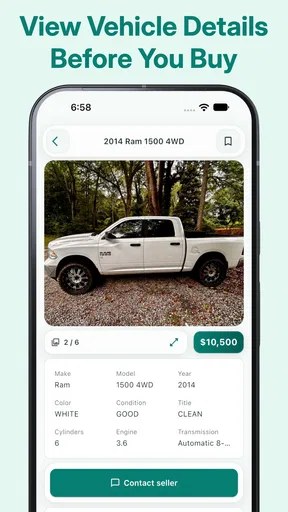
- Large selection of new and used vehicles from multiple sellers.
- Detailed listings include photos
- mileage
- price
- and vehicle specifications.
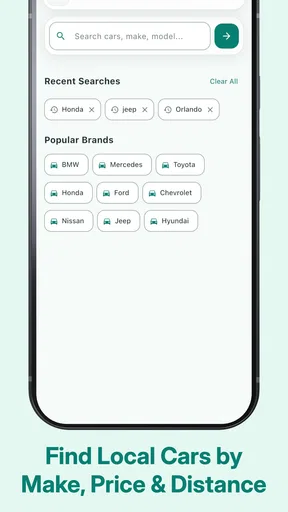
- Search filters make it easy to narrow results by make
- model
- and budget.
- Saved searches can help you track cars that match your preferences.
- Useful platform for comparing prices before contacting a seller.
Cons
- Listing quality and accuracy may vary between individual sellers.
- Some vehicles may be located far from your current area.
- Dealer or seller responses can be slow or inconsistent.
- Additional fees may apply depending on the seller or purchase process.
- The app may require account creation for some features.
FAQs for Car Trader – Buy & Sell Cars
What is Car Trader – Buy & Sell Cars?
Car Trader – Buy & Sell Cars is a marketplace app designed to help users browse vehicles, compare listings, and connect with sellers. You can search by make, model, price, mileage, location, body style, and other criteria. It is intended for people looking to buy a new or used car, as well as owners or dealers who want to advertise a vehicle for sale.
Can I buy a car directly through the app?
The app generally helps you discover vehicles and contact the person or dealership offering them, but the complete purchase is usually arranged outside the application. You should communicate with the seller, inspect the car, verify its history and documents, arrange a test drive, and agree on payment and delivery details independently. Never send money before confirming the seller and vehicle are legitimate.
How can I sell my car using Car Trader – Buy & Sell Cars?
To sell a vehicle, you normally need to create an account or provide contact information, then add details such as the make, model, year, mileage, condition, price, location, and photographs. A clear and accurate listing can attract more serious buyers. Before publishing, review the information carefully and check whether the app or marketplace applies advertising fees or listing restrictions.
Is Car Trader – Buy & Sell Cars safe to use?
The app can make vehicle searching and communication more convenient, but users should still take normal marketplace precautions. Keep conversations within the platform when possible, be cautious of unusually low prices, verify seller identities, and avoid sharing unnecessary personal or financial information. Inspect the vehicle and documents in person, meet in a safe location, and use a secure payment method.
Does the app include vehicle history, financing, or delivery services?
Available services may depend on the country, listing, seller, and current version of the app. Some vehicles may include extra information or links to history checks, financing options, valuations, or dealership services, but these features should not be assumed for every listing. Always read the individual advertisement carefully and confirm costs, eligibility, warranties, and delivery arrangements directly with the seller.


